![Sonio-logo-samsung-1 1-1.png]](https://lp.sonio.ai/hs-fs/hubfs/Sonio-logo-samsung-1%201-1.png?height=40&name=Sonio-logo-samsung-1%201-1.png)
What you'll learn
- How measurements arrive in Sonio and where to manage them.
- How to update a measurement value and let Sonio recompute the dependent results.
- How to change the author (the curve used for the percentile) on a single measurement.
- How to read percentiles and Z-Scores, and what to do when one does not show.
Before you start
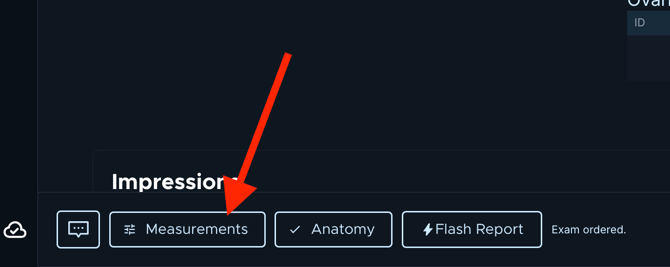
- Open the Measurements button at the bottom of the report. It opens a dialog titled Manage Measurements.
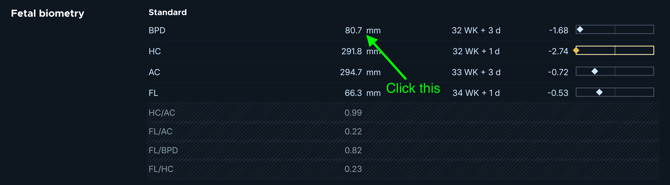
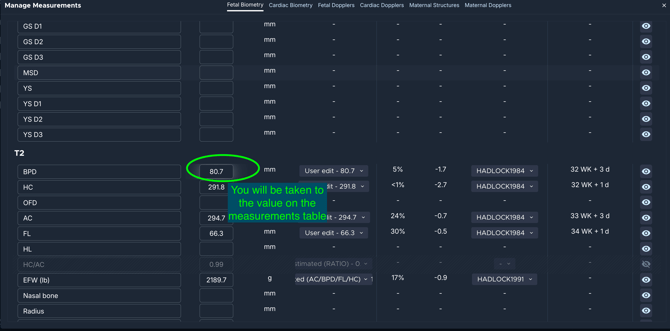
- You can also click any biometry value in the report body to jump straight to that measurement's row.
- You need report-edit permission to edit measurements.
- The exam must not be signed or frozen. If the report is already signed, the reader must unsign it before you can change an author or edit a value.
How it works
Measurements arrive automatically from the ultrasound machine via the DICOM Structured Report (SR).- You must end the exam on the machine for the SR to be sent.
- Until the SR arrives, the report shows that it is waiting for measurements. As measurements arrive, they populate both the report's biometry section and the Manage Measurements table in real time.
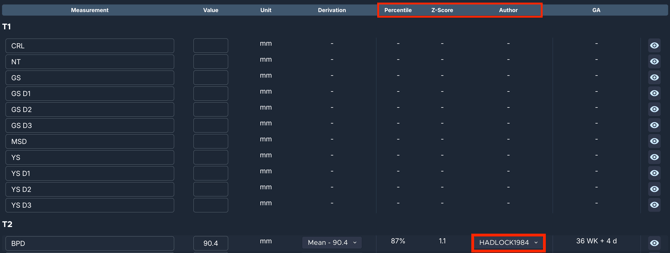
The table has these columns: Measurement, Value, Unit, Derivation, Percentile, Z-Score, Author, and GA, plus a visibility (eye) toggle. Two settings on each row affect the results:
- The Author sets the percentile curve for that measurement. It drives the Percentile and Z-Score.
- The author or method used to compute GA is chosen separately, in the dating table. GA is driven by the assigned dating.
Percentiles and Z-Scores only compute when the exam has an Assigned dating with a GA. If none is set, the dialog prompts "Please select an Assigned dating in the dating table", and the Percentile, Z-Score, and Author show "-". A percentile displays as a number, or as "<1%" or ">99%" at the extremes. A value below the 5th or above the 95th percentile is flagged as at-risk. If the value, EFW, or GA falls outside a curve's valid range, Sonio shows that the measurement "is not compatible with this author".
EFW is always estimated, never measured directly.
Step-by-step: Update a measurement value
- Open the Measurements button at the bottom of the report to open Manage Measurements.
- Find the measurement's row.
- Type a new number in the Value field for that row.
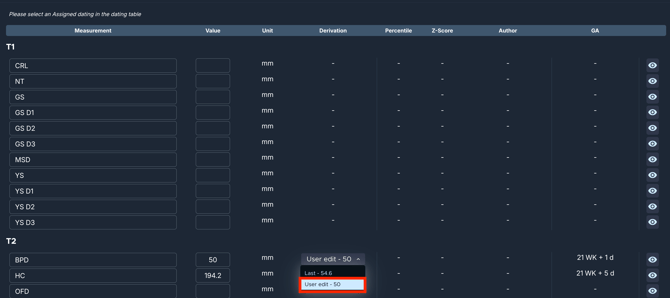
- Confirm the result: a manual edit overrides the machine value, so the row's Derivation becomes a manual edit. Sonio recomputes the dependent values (for example AFI, MVP, ratios) and the Percentile and Z-Score.
💡Tip
To remove your value, clear the Value field. A later SR from the machine can update values you have not manually edited, so a manual edit is the way to lock in a correction. You can also choose which captured value is used: the Derivation dropdown lets you pick last, minimum, or maximum when the machine sent more than one.
Step-by-step: Change the author for a measurement
- Open the Measurements button at the bottom of the report to open Manage Measurements.
- Find the measurement's row.
- Click the Author dropdown on that row.
- Pick a different author (for example Hadlock 1984).
- Confirm the result: Sonio recomputes the Percentile and Z-Score for that measurement using the new author. The author is set per measurement, not globally; there is no "apply to all".
⚠️ Changing the author affects comparability
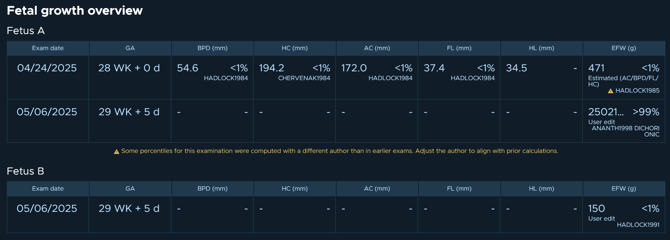
Changing the author mid-pregnancy breaks comparability. Percentiles computed with a different author than earlier exams are no longer directly comparable across visits. Sonio may show a warning in the Fetal Growth Overview when percentiles for the current exam were computed with a different author than earlier exams. The warning prompts users to adjust the author to align with prior calculations. Only change the author deliberately.
Common questions / troubleshooting
Why is no percentile showing?
- A percentile does not display when no author is selected, when no Assigned dating with a GA is set, or when the value is outside the curve's valid GA range. Set an Assigned dating in the dating table first, then check the Author on the row.
My measurements did not come from the machine. What do I do?
- Measurements arrive via the DICOM Structured Report (SR), and the SR is only sent once you finish the exam on the machine. Until then, the report shows it is waiting for measurements. Finish the exam on the machine, and the values populate the report and the Manage Measurements table in real time.
Can I delete a measurement?
- No measurements cannot be deleted from the user interface. This currently requires an escalation to Sonio Support.
- Measurements can be hidden from the report by clicking on the eye icon next to them. This will hide the values from the report.
- Repeatable "identifier" rows (for example a list of follicles or vessels) have a + to add a row and a trash icon to delete one.
Why does Sonio differ from the ultrasound machine?
- Sonio's GA and percentiles can differ from the machine because the machine may use a simple average or a table while Sonio uses a regression curve or equation. See the dating article for details.