![Sonio-logo-samsung-1 1-1.png]](https://lp.sonio.ai/hs-fs/hubfs/Sonio-logo-samsung-1%201-1.png?height=40&name=Sonio-logo-samsung-1%201-1.png)
What you'll learn
- What each dating method is, and broadly when it applies.
- How Sonio turns the assigned method into a GA and EDD.
- How to assign or change the dating method in the Dating table.
- How to troubleshoot a GA or EDD that looks wrong.
How it works
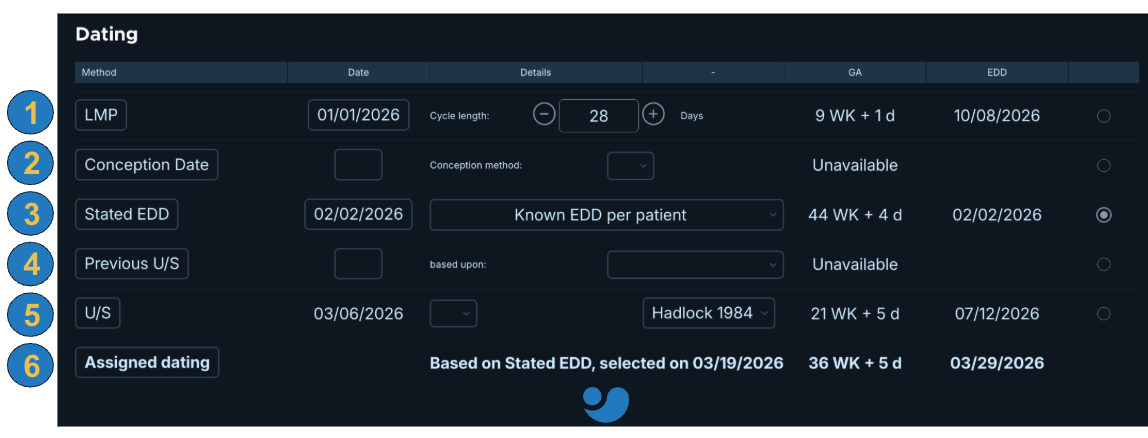
The Dating section is a table. Each candidate dating method is a row. You select and assign exactly one row as the source of truth. That row is shown as the Assigned dating.
The assigned method drives the GA (gestational age), EDD (estimated date of delivery), and percentiles (growth curves) everywhere in Sonio: the nav bar, the fetal growth overview , the dashboard GA column, percentiles and Z-scores, trimester filters, and the PDF.
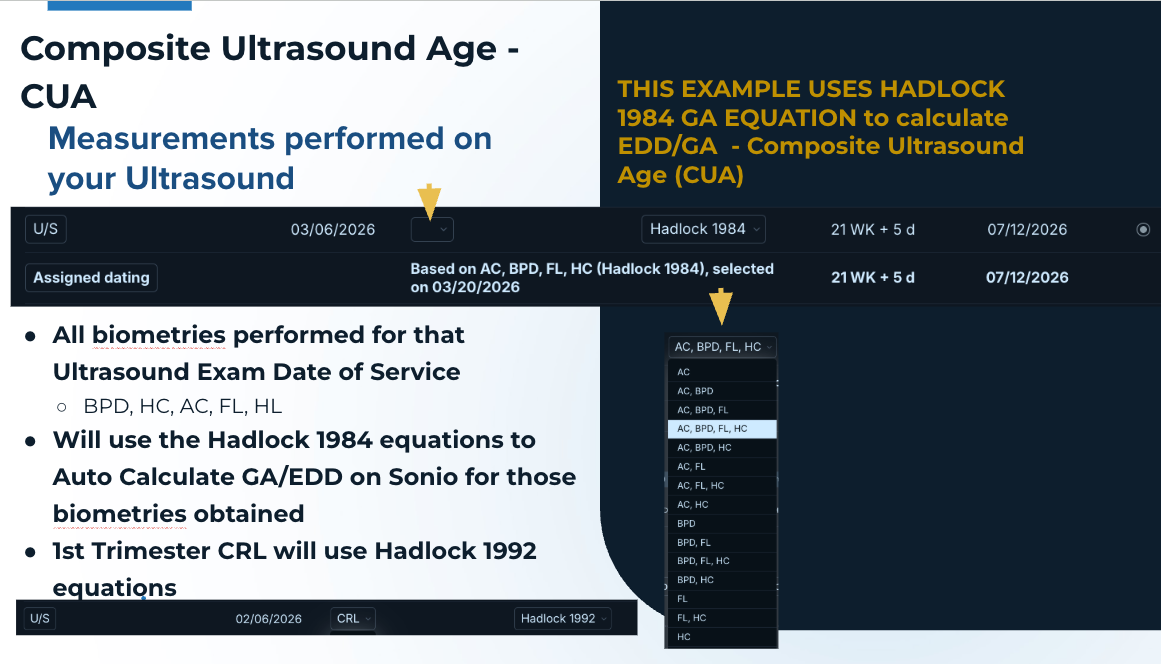
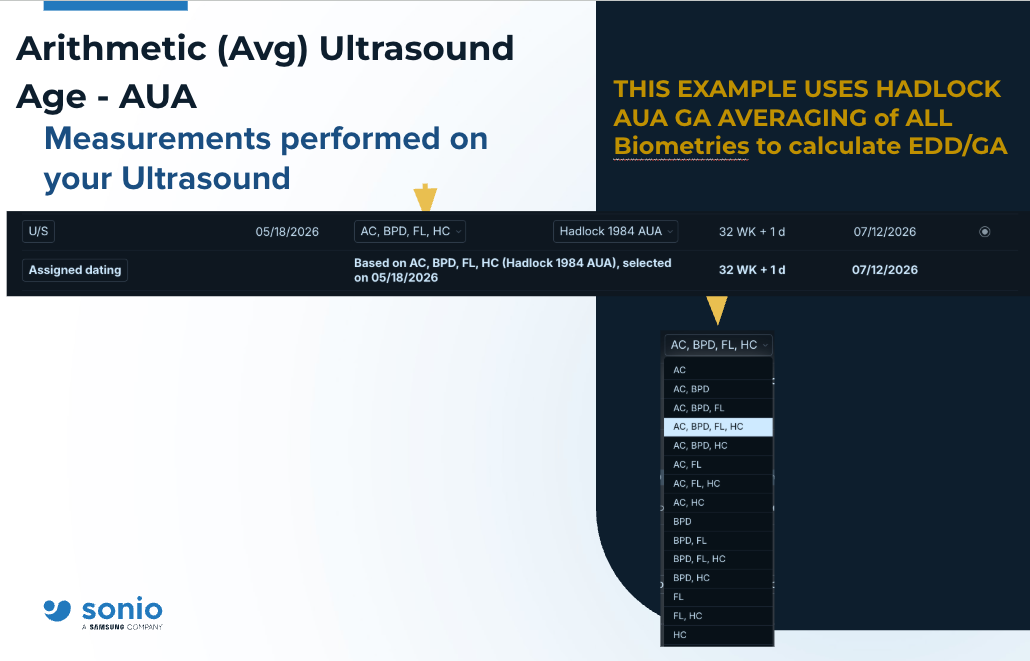
GA, EDD, and percentiles compute from the assigned method's value. When dating comes from ultrasound, the U/S row uses a composite ultrasound age (CUA) biometry equation (defaulted Hadlock 1984). An AUA option is available on the U/S row: after you pick the biometry parameters, you can choose the curve or AUA. Sonio uses a composite equation or Hadlock curve, so Sonio's GA/EDD/Percentiles can differ slightly from a machine that reports an arithmetic (avg) ultrasound age.
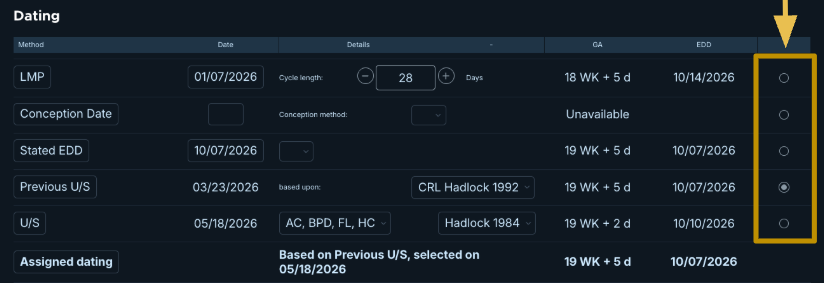
The assigned dating carries forward to later unlocked exams in the same pregnancy episode. It is pre-filled and you can override it. A "Previous U/S" row preserves the first exam's dating.
The assigned row shows a text description on what was selected: "Based on [method], selected on [date]". When dating is carried forward, it reads "Assigned during examination performed on [date]".
The dating methods
Each method below appears as a row in the Dating table. Labels are data-driven; the names used here match what you see in the product.
- LMP (Last Menstrual Period): you enter the LMP date and cycle length. GA adjusts for cycle length. Used when no reliable early ultrasound is available, or when LMP is already established.
- Conception Date: you enter the conception date. Options include Spontaneous, IUI, IVF, Ovulation drugs, and others. Used when a conception date is known.
- Stated EDD: used when an estimated due date (EDD) is already known and should be entered directly, rather than calculated from LMP, conception date, embryo transfer, or current ultrasound biometry. For example, the EDD may come from a referring provider, an outside prior ultrasound, or stated by the patient or the patient’s record.
- Previous U/S: a prior ultrasound's biometry EDD & GA, carried over from the prior exam from within your facility.
- U/S (current / today’s ultrasound biometry): computed automatically from this exam's measurements. You pick the biometry combination and standard (for example CRL, or AC+BPD+FL+HC) and the author or curve. A first-trimester ultrasound (CRL) is generally the most reliable dating and is usually preferred when available.
- Assigned Dating: the dating method currently selected as the source of truth for the exam (ex.1 -5). Sonio uses the assigned dating to calculate and display GA, EDD, Percentiles, and EFW throughout the report and related areas of the product like the fetal growth overview table. Only one dating method can be assigned at a time. If the assigned method is changed, Sonio recalculates all associated variables for un-finalized exams in the same pregnancy episode; signed or locked exams are not changed.
The detailed clinical rules for when to use each method, and when to change the dating, are determined by internal best practices and clinical guidelines within your organization/facility.
Step-by-step: Assign or change the dating method
- Navigate to the Dating section of the report.
- Review the rows in the dating table. Each row is a candidate dating method.
- For a method that needs input, enter its values (for example the LMP date, or the Conception Date).
- For the U/S row, pick the biometry combination and standard, then choose the curve or AUA.
- Click the radio button in the right column of the row you want to use. This assigns that method.
- Confirm the row shows as the Assigned dating, with correct selection method "Based on [method], selected on [date]".
- To revert dating back to the previous exam's assignment, click the revert (reload) icon on the assigned row.
💡Tip
If Sonio's GA/EDD do not match the ultrasound machine, switch the U/S row details to AUA versus Hadlock 1984. The machine may report an Arithmetic (Average) Ultrasound Age (AUA), while Sonio defaults to a Composite Ultrasound Age (CUA) or the Hadlock equation curve. The ultrasound system can be configured to match either AUA or CUA. Please consult your local ultrasound vendor.
⚠️Changing the assigned method recomputes dating
Changing the assigned method recomputes GA and EDD on all unsigned exams in the same pregnancy episode. Signed or frozen exams are skipped and are not affected.
Common questions / troubleshooting
Why is my GA or EDD wrong or negative?
Check the exam date (date of service). GA is computed from the exam date, so a negative or wrong GA usually means the exam date was not updated.
Why does Sonio's GA differ from the ultrasound machine?
The machine may use an arithmetic ultrasound age (AUA), while Sonio defaults to a Composite ultrasound Age or Hadlock curve. To match the machine, switch the U/S row to AUA. Some older ultrasounds use an outdated Hadlock table and not the revised equation to correct the GA,EDD, and percentiles.
Does dating carry forward to the next visit?
Yes, within the same pregnancy episode. The selected assigned dating carries forward to future un-finalized exams. It is preselected and you can override it. Signed or locked exams are not changed.
How do I change the dating method?
Click the radial button on the row you want in the dating table. That assigns the method and recomputes GA and EDD on the unsigned exams in the episode.
Why don't percentiles display in some cases?
First ensure you have a selected dating method on the radial button options. Second check to see if the gestational age (GA) is in range and supported by the current defaulted author that calculates the growth curves. For example Williams EFW grwoth curves are not supported for <20 weeks GA.