![Sonio-logo-samsung-1 1-1.png]](https://lp.sonio.ai/hs-fs/hubfs/Sonio-logo-samsung-1%201-1.png?height=40&name=Sonio-logo-samsung-1%201-1.png)
What are private notes?
Private notes are internal notes saved to the patient record. They do not appear in the report PDF, and they carry over to future exams for the same patient. Anyone with access to the patient record can view them.
Step-by-step: add a private note
- You can edit, add, or view Private Notes in multiple places:
- On the exam Prepare exam tab.
- In the right-hand sidebar (available on any tab)
- In the Patient’s Record
- Type your note in the "Add your notes here…" field. It saves automatically.
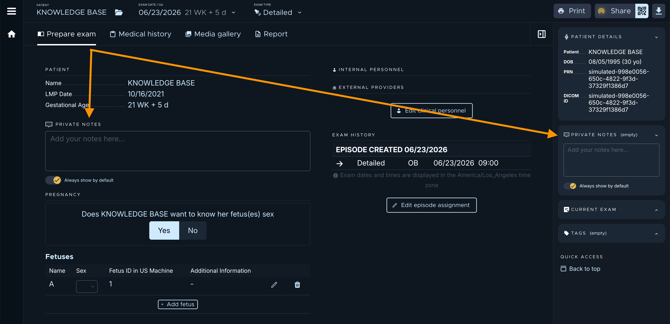
💡 Tip: Toggle Always show by default if you want this note to appear automatically whenever you open this patient’s record or any of their exams.
Common questions / troubleshooting
Do private notes print on the report?
No. They never appear in the report PDF.
Who can see a private note?
Anyone with access to that patient's file. It is part of the patient record.
Will my note still be there at the next exam?
Yes. Private notes are stored on the patient’s record, so they carry across that patient's exams.