![Sonio-logo-samsung-1 1-1.png]](https://lp.sonio.ai/hs-fs/hubfs/Sonio-logo-samsung-1%201-1.png?height=40&name=Sonio-logo-samsung-1%201-1.png)
Preliminary results sent to your EHR
On exam submission, Sonio can now send a preliminary-result notification into your EHR with a direct link to open the exam in Sonio - so reviewing providers are notified without monitoring another dashboard or manually searching for ready exams.
This feature is available upon request - if you’re interested, reach out to your Account Manager.
Patient birthdates now respect your date format
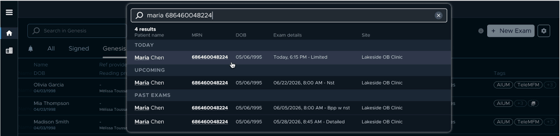
Birthdates now display in your configured format (e.g. dd/mm/yyyy or mm/dd/yyyy) across the global search bar, worklist patient details, patient search results, the Start Exam similar-patient warning, and exam review - instead of a raw ISO value, for better readability.
Fax errors suppressed for providers without a fax
When optional fax is enabled, misleading fax-failure errors are no longer shown for referring providers who have no fax number configured.
🌟 In case you missed it: find a patient or exam faster thanks to the brand-new Global SearchImproved performance, search across all patients (not filtered by tab), and exams grouped by date with key details at a glance - so you save time and can be sure you've got the right exam before clicking. Test out the new Global Search!
And our first adopters are already convinced: 💬 “The new search you’ve implemented makes things more straightforward as it’s a main search” - Linda, Sonographer
💬 "I like that I could type anything in the search bar and Sonio would find the patient, instead of having to choose a field like name or MRN or DOB” - Mary, Reader
Note: the advanced search stays available just below the new one - to find exams based on date of service, a specific date range, and/or patient DOB.
|
Also in This Release
- More secure SSO logins on shared computers: On devices used by several people, someone logging in could sometimes be signed in under the previous user's account by mistake - if that person hadn't fully logged out. Now Sonio always asks each user to confirm their login, so you're only ever signed in as yourself.
- Start Exam refreshed for Light mode: The new Start Exam screen now renders correctly and is fully usable in Light mode.
- Attached images reliably saved to the report: Images you selected to include in a report could sometimes silently fail to save, resulting in missing images in delivered reports. This is now fixed for all users.
- Sign button loading state: The report Sign button now shows a loading state when there are pending report edits.
- Dating table display issue fixed: Selecting a dating method in the GA table no longer briefly shows two radio buttons selected at once.
- Clearer Referring Provider permissions: Edit and delete icons on the Referring Provider field now appear only for users who have permission to use them.
- Corrected ICD-10 codes: Fixed malformed codes in the default dictionary that could cause your EHR to reject charge messages and block claims.