![Sonio-logo-samsung-1 1-1.png]](https://lp.sonio.ai/hs-fs/hubfs/Sonio-logo-samsung-1%201-1.png?height=40&name=Sonio-logo-samsung-1%201-1.png)
Review fetal anatomy findings at a glance
Your fetal anatomy findings now appear as a structured table within the report. Each structure is grouped by anatomy section, like Head/Neck, Face, Abdomen and Cardiac, and shows its status and any comments on the same row.
Sonographers can check findings quickly before submitting, and clinicians can read a finalized report with confidence. Every assessed structure is included, and the table prints cleanly to PDF.
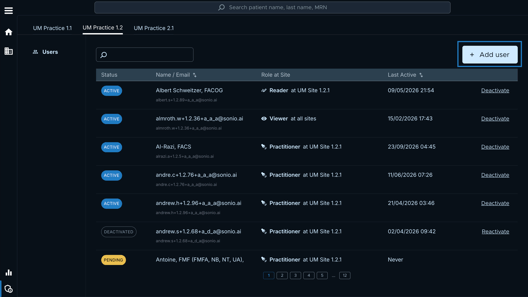
Add and reactivate users for your practice
Admins can now add new users and reactivate former ones instantly, with no support tickets required. Editing users is coming soon 🚀
Choose the Referring Provider when you create an exam
You can now select the Referring Provider right in the exam creation form, with no detour through Clinical Panel → Update.
Reuse impressions from previous exams
When writing a follow-up report, you can insert a previous exam’s impressions as a canned comment. If there were several, they’re all brought in, each on its own line.
See which dating author was used
The measurement panel now shows the author used for dating, so you can confirm the reference at a glance.
Identify US providers by NPI
US providers can now be identified by their NPI number, the standard 10-digit identifier. It’s now the default identification type for US users.