![Sonio-logo-samsung-1 1-1.png]](https://lp.sonio.ai/hs-fs/hubfs/Sonio-logo-samsung-1%201-1.png?height=40&name=Sonio-logo-samsung-1%201-1.png)
Faster Report Loading
Report loading and updating is now noticeably faster thanks to a rendering optimization under the hood. Instead of rebuilding the entire report structure on every change, Sonio now uses a more efficient approach that reduces CPU usage, meaning less lag when navigating and editing reports.
Have you noticed better performance when using Sonio? We’d love to hear from you!
Clearer Guidance When Amending Signed Reports
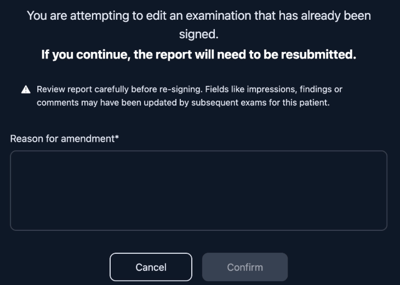
A new confirmation dialog now appears whenever you un-sign a report, surfacing a key clinical-safety risk at the right moment.
Why this matters:
Some practices rely on the free-text Impressions, Findings, and Comments fields to repeat standing language across a patient's exams (for example, a default recommendation phrase). Because these fields are stored at the episode level, the same value is shared across every unsigned exam for that patient — past and future. If the text has been edited on a more recent exam, un-signing an earlier one will pull in that newer value, and re-signing would generate a PDF that no longer matches the original report.
What the new warning does:
- Highlights with an attention icon that the report should be reviewed before re-signing
- Calls out that patient- and episode-level fields (Impressions, Findings, Comments) may have changed
- Simplifies the label to "Reason for amendment"
Before you un-sign:
- Copy the current Impressions, Findings, and Comments from the exam you're amending
- Do the same for any unsigned future exams for that patient — they share the same fields and will be overwritten too
- Make your amendment, then paste each saved value back into the relevant exam before re-signing
Your Patient Search Just Got a Major Update
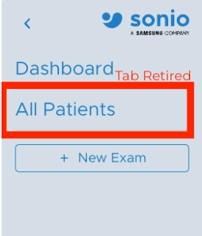
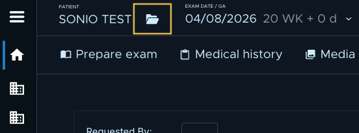
The dashboard now centralizes and replaces the legacy Patients page with a more powerful experience with faster search, smarter filtering, and everything accessible from one place. To pull up a specific patient, use the folder icon next to the patient name on the dashboard or in the header of the exam page.

Also in This Release
- Deactivated Sonio Detect on non-OB exams: Detect will no longer evaluate images for Gynecology exam types, such as Pelvic Exams, preventing Gyn images from matching to OB views
- Print and share image order is now consistent: Opening the print or share selection panel multiple times will no longer change image order
- Improved image annotation visibility: Annotations placed on the bottom-left corner of ultrasound images are now read by Sonio AI
- Dashboard View alerts fixed: The yellow number that appears when navigating from tab to tab on the dashboard now vanishes after you have checked the tab