![Sonio-logo-samsung-1 1-1.png]](https://lp.sonio.ai/hs-fs/hubfs/Sonio-logo-samsung-1%201-1.png?height=40&name=Sonio-logo-samsung-1%201-1.png)
Before you start
This applies to non-SSO accounts (email and password). If your organization uses single sign-on (for example Google, Microsoft, or Okta), follow your organization's password reset process. Sonio cannot reset a single sign-on password.
Step-by-step: reset your password
- Go to https://us.sonio.app/login.
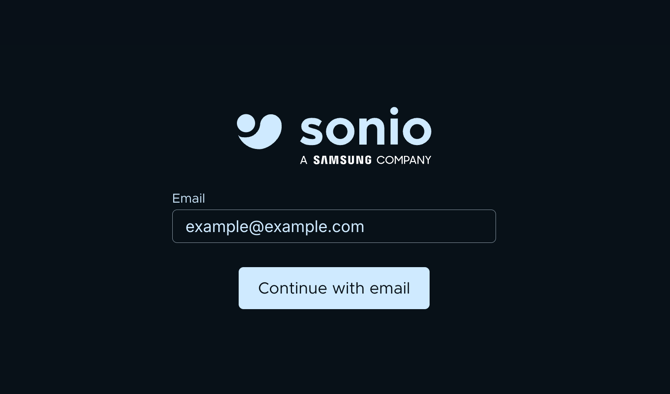
- Enter your email, and click Continue with email.
- Click Forgot your Password?
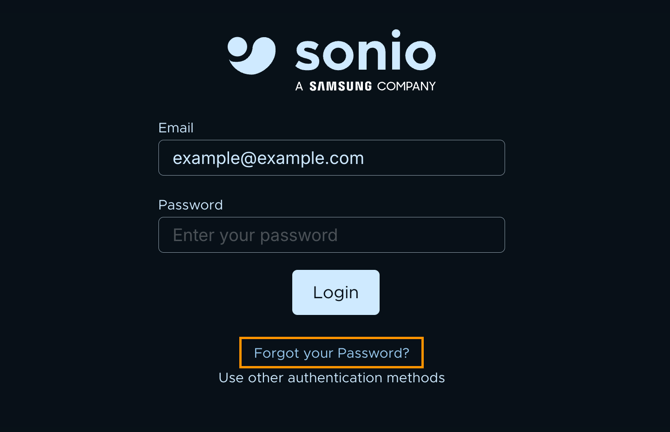
- You will be prompted to enter your email and Submit.
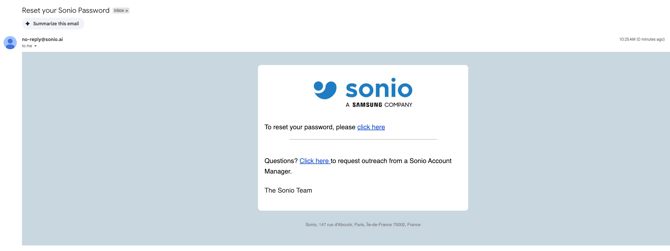
- A reset link is sent from no-reply@sonio.ai to that email address. Click the reset link and follow the prompts to set a new password.
💡 Tip: If the email does not arrive, check your spam folder, confirm you entered the correct address, and wait a few minutes. If it still does not arrive, ask your Sonio admin or contact Sonio support.
Common questions / troubleshooting
I use SSO. How do I reset my password?
Through your organization's process, not Sonio. Sonio does not hold your SSO password.
The reset link is not working or expired.
Return to the login screen and request a new reset email.