![Sonio-logo-samsung-1 1-1.png]](https://lp.sonio.ai/hs-fs/hubfs/Sonio-logo-samsung-1%201-1.png?height=40&name=Sonio-logo-samsung-1%201-1.png)
Before you start
- Signed exams can't be moved. A signed exam shows a lock icon and no three-dots menu, so unsign it first. To move a whole episode, unsign all of its exams first.
How it works
- Each patient's exams are grouped into pregnancy episodes, shown as a banner per pregnancy in the Summary tab of the patient record.
- You move an exam by associating it to another pregnancy, or to a new pregnancy you create on the spot.
- One pregnancy is the preferred pregnancy, marked with a star. New exams attach to it automatically. Setting the preferred pregnancy only affects future exams; it does not move exams that already exist.
Step-by-step: Reassign exams to a new pregnancy
- Open the patient record. From within an exam, select the patient's name and click Patient Record (or click the 📁 icon next to the patient's name).
- Open the Summary tab. Exams are grouped under a banner for each pregnancy.
- For each exam you want to move, click the three-dots icon next to it and select Associate to another pregnancy. If the exam doesn't belong to any pregnancy yet, the option reads Attach to a pregnancy, but the steps are the same.
- In the modal (To which pregnancy do you want to associate this examination?), open the dropdown, choose New pregnancy, and click Confirm association. This creates the new pregnancy episode. Until you rename it, it appears as Episode created {date}. Repeat for every exam you want in the new episode.
- Set the new pregnancy as the preferred one: click the empty star next to it (Set as preferred pregnancy). You'll know it worked when the star is filled and new examinations for this patient attach to this pregnancy automatically.
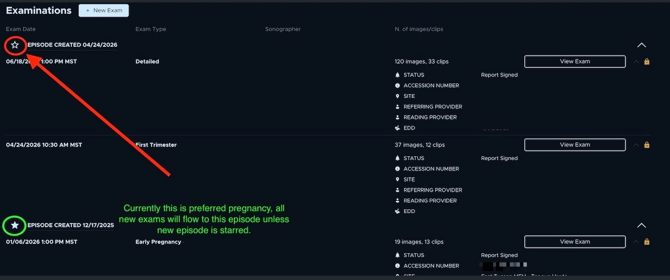
⚠️ Don't skip the star. Setting the preferred pregnancy is the step most people miss. If you move the exams but never set the star, new images keep attaching to the old pregnancy. In the Summary tab the preferred pregnancy is labelled Current episode, which is the same thing.
⚠️ Moving or unsigning exams can affect episode-level data. In Sonio, several fields are shared at the pregnancy episode level, including:
- Dating (assigned dating and other dating methods)
- Indications & findings suggestions from prior exams in the same episode
- Fetal growth overview history (prior measurements/percentiles shown for comparison)
- Fetal sex (Genitalia) within the episode
Because percentiles and growth are calculated from episode dating, they can shift if dating changes. After moving/unsigning exams, re-check dating, indications/findings, and growth tables.
Examples (when to use this)
- Patient returns for a new pregnancy: new exams keep attaching to last year's pregnancy. Create a new pregnancy, move the new exams to it, and set it as the preferred pregnancy.
- Wrong worklist used at exam creation: an exam was started against the wrong pregnancy. Move it to the correct episode from the Summary tab.
Common questions / troubleshooting
New images are still attaching to the old pregnancy.
The preferred-pregnancy star isn't set on the new episode. Open the Summary tab and click the empty star next to the new pregnancy.
Does Sonio create a new pregnancy automatically?
No. You create it manually by choosing New pregnancy when you associate an exam.
The three-dots menu is missing on an exam.
The exam is signed, so a lock icon shows in its place. Unsign it, then move it.