![Sonio-logo-samsung-1 1-1.png]](https://lp.sonio.ai/hs-fs/hubfs/Sonio-logo-samsung-1%201-1.png?height=40&name=Sonio-logo-samsung-1%201-1.png)
What you'll learn
- How to enter the correct MRN while creating a patient at the start of an exam.
- How to move an exam onto the patient who already holds the correct MRN, when a duplicate was created.
- How to handle an MRN that is wrong on an EHR-integrated patient.
- Why the MRN field locks after it is saved, and how to avoid the problem in the first place.
Before you start
- Roles and access. To create a patient you need the "create an examination" permission for at least one site (patient creation is part of examination creation; there is no separate patient-creation permission). To move an exam yourself you need permission to edit the examination, and the exam must contain images.
- Self-service availability. Moving an exam to another patient is part of Sonio's self-service Data Repair, which is not enabled for every organization. [
- Availability depends on your organization’s configuration.
How it works
The MRN (Medical Record Number, also called the EHR ID) appears in the patient record under Medical health record ID, in the patient demographics. It is distinct from the Sonio ID and the DICOM ID shown alongside it.
The key concept: the MRN is set when you create a patient, and it locks afterward. You can only set or change it while the field is still empty and the patient has no ongoing imaged exam. Once an MRN is saved, or once a patient arrives from an EHR or worklist with the MRN already filled in, the field is disabled and any change is silently ignored.
So a wrong MRN that is already saved cannot be fixed by editing the field. Correcting it means one of three things:
- The patient does not exist yet: create them with the correct MRN.
- A separate patient record already holds the correct MRN: move the exam onto that patient and drop the duplicate.
- The patient came from your EHR: the MRN syncs automatically from the EHR, so you fix it in the EHR and request a data repair.
The MRN must be unique within your organization. If you try to reuse one, Sonio rejects it with the message This MRN already exists.
Step-by-step: Enter the correct MRN when creating a patient
Use this when the patient does not exist in Sonio yet. This is the cleanest path: get the MRN right at the start.
- Select the + New Exam tab on the top right from the dashboard.
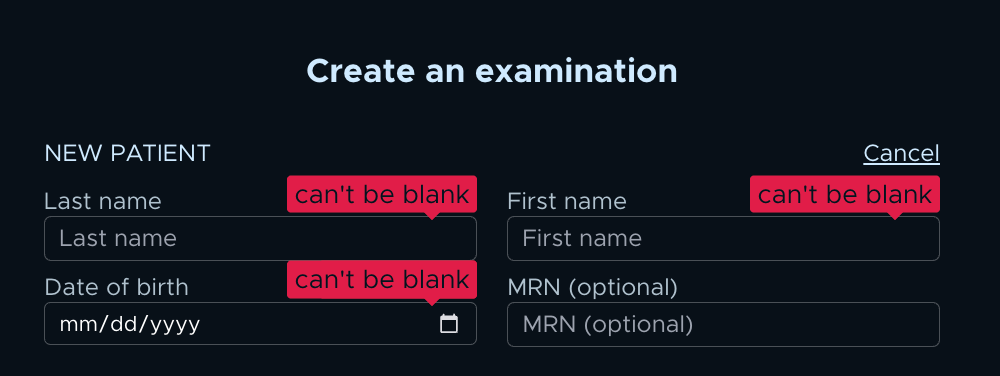
- Select Create a new patient.
- Fill in Last name, First name, and Date of birth.
- Enter the correct number in the MRN (optional) field.
- Confirm to create the patient and start the exam.
You'll know it worked when the new exam opens against the patient and the patient demographics show your MRN under Medical health record ID.
💡 Tip
Before you start an exam, search for the patient by MRN. Most wrong-MRN cases happen because the patient was not searched by MRN when scheduling or starting the exam, so the scan landed on the wrong or a duplicate patient. Searching by MRN first prevents this.
Step-by-step: Move the exam to the patient with the correct MRN
Use this when a separate patient record already holds the correct MRN. This is common when an MRN was mistyped at the machine and created a duplicate. You cannot edit the MRN, so instead you move the exam onto the correct patient.
- Open the patient or exam with the wrong MRN.
- Open the three-dot menu (⋮).
- Select Move entire exam to correct patient.
- Search for the correct patient by name or MRN.
- Confirm the move.
You'll know it worked when the exam appears under the patient with the correct MRN.
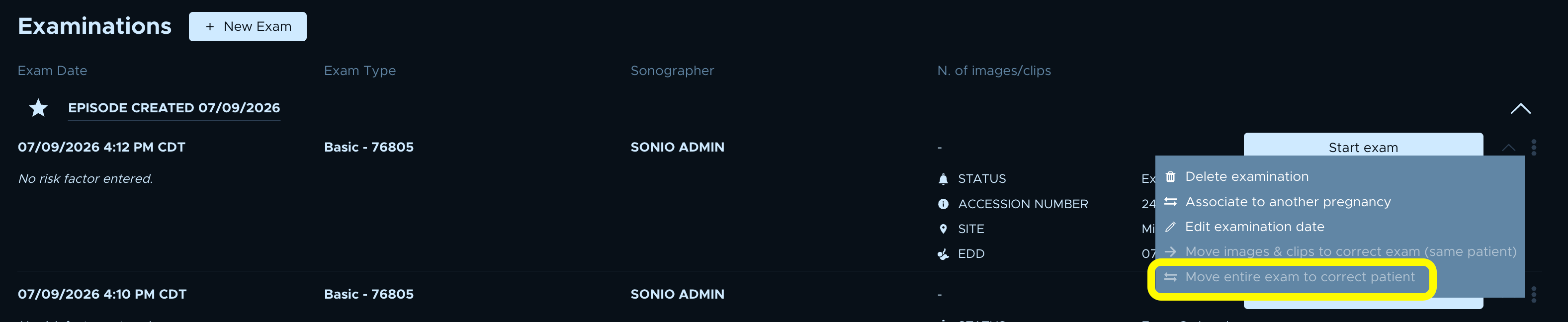
If you only need to move images or clips within the same patient, use Move images & clips to correct exam (same patient) instead. Consolidating two records is done through Move entire exam to correct patient; there is no separate patient "merge" action.
⚠️ When an exam cannot be moved
The exam must contain images. An empty exam cannot be moved. EHR-linked exams cannot be moved through self-service: Sonio shows a message asking you to submit a ticket with the current exam's URL and the target patient's first name, last name, and date of birth. The separate "Move images & clips to correct exam (same patient)" action also requires the report to be unsigned first.
Step-by-step: Correct an MRN for an EHR-integrated patient
Use this when the patient came from your EHR and the MRN is wrong. The MRN is locked in Sonio because it syncs from the EHR.
- Correct the MRN in your EHR or front-desk system.
- Submit a data-repair request via Contact Sonio
You'll know it worked when Sonio reflects the corrected MRN after the repair and the next EHR sync.
⚠️ Fix the EHR first
If you correct the MRN only in Sonio, the next EHR sync can overwrite it again. Correct it in the EHR and submit the data-repair request so the fix holds.
Examples (when to use this)
- A sonographer is about to scan a new patient who is not in Sonio yet. They create the patient through the create-an-examination flow and type the correct MRN into the MRN (optional) field, so the record is correct from the first image.
- An MRN was mistyped at the ultrasound machine, creating a duplicate patient. The correct patient already exists, so the user opens the three-dot menu (⋮), chooses Move entire exam to correct patient, finds the correct patient by MRN, and confirms.
- A patient arrived from the EHR worklist with the wrong MRN. The field is locked, so the front desk corrects it in the EHR and the team submits a data-repair request to their Sonio contact.
Common questions / troubleshooting
Why can't I edit the MRN field?
The MRN can only be set or changed while it is empty and the patient has no ongoing imaged exam. Once it is saved, or once the patient came from an EHR or worklist with the MRN already filled in, the field is disabled and changes are silently ignored. To correct it, create the patient with the right MRN or move the exam to the patient who has the correct MRN.
I get "This MRN already exists."
The MRN must be unique within your organization. That message usually means a patient record already holds that MRN. Rather than forcing the number, move the exam onto the existing correct patient using Move entire exam to correct patient.
The patient came from our EHR and the MRN is wrong.
The MRN is locked because it syncs from the EHR. Correct it in the EHR or front-desk system, then submit a data-repair request to your Sonio contact. Fixing it only in Sonio risks the EHR overwriting it on the next sync.
I don't see the option to move the exam.
Check that the exam contains images and is not EHR-linked. Confirm you have permission to edit the examination, and that self-service Data Repair is enabled for your organization. If any of these is not met, contact your Sonio support team.