![Sonio-logo-samsung-1 1-1.png]](https://lp.sonio.ai/hs-fs/hubfs/Sonio-logo-samsung-1%201-1.png?height=40&name=Sonio-logo-samsung-1%201-1.png)
Find any patient instantly with new Global Search
A new search bar is now permanently visible at the top of every screen in Sonio dashboard, exam, media gallery, everywhere. Type a patient name or MRN and results appear as you type, grouped by today's exams, upcoming, and past. Each result shows the patient name, MRN, date of birth, exam type, and site so you can confirm you have the right exam before clicking.
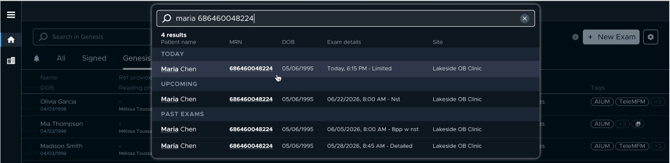
Need a more advanced lookup? Hit "Go to advanced search" from any result to jump straight into the full dashboard search to find exams based on date of service, a specific date range, and/or patient DOB.
Assigned Dating Now Updates Correctly After Amending
In a multi-exam episode, manually editing the Previous U/S row on a subsequent exam (for example, updating the gestational age method or week/day values) now correctly updates the Assigned Dating row in bold at the top of the dating table.
Before this fix: The bold Assigned Dating row stayed frozen at its previous value even after you changed the Previous U/S entry, meaning the dating conclusion shown on the report didn't match what you had just entered.
Now: The Assigned Dating row updates immediately to reflect your edit, keeping the report accurate without requiring a workaround.
Measurement Accuracy: Several Clinical Fixes
Zero is now a valid measurement value: If a calculation option for a measurement had a value of exactly 0, the report was incorrectly falling back to the previous non-zero value. Sonio now correctly displays 0 when that is the true calculated result.
Measurement dropdown and field now always match: In the measurements panel, the value shown in the editable field and the value shown in the derivation dropdown are now always the same number, eliminating the confusing mismatch caused by differing rounding logic.
LMP-based dates no longer display as NaN in reports: Measurement placeholders linked to an LMP date value now render as a correctly formatted date (e.g. 07/15/2026) instead of "NaN" in the report.
Also in This Release
- Fax error shown when fax number is missing: Attempting to send via fax when no fax number is configured now shows a clear error instead of silently recording the fax as sent
- Doppler image labels restored: Doppler images now correctly show the "Doppler" label in the media gallery and render QC indicators properly
- Media gallery scroll after new image: When a new image arrives while the media gallery is open, the gallery now scrolls to center on the newly received image
- Multi-window gallery no longer shows "image not captured": Navigating from the report back to the media gallery while a second window is open no longer shows the error state
- DICOM batch download improvements: If one DICOM file fails during a batch download, the rest of the batch now continues successfully instead of aborting
- Re-association navigation fixed: After re-associating an unmatched image using a direct suggestion, you now land on the newly associated image instead of an error state
- Faster, smoother navigation: Navigating between the dashboard and an exam no longer triggers a full page reload
- TeleMFM forwarding redirect fixed: After forwarding an exam via TeleMFM, you are now correctly redirected to the forwarded exam instead of the login page
- GYN exams now sortable in the media gallery : Sorting images by protocol or acquisition time is now available for GYN and other non-OB exam types
- Readers stay on the right org after submitting a report : Remote reading providers are now kept on the organization they were viewing after submitting a report, rather than being redirected to their home org