![Sonio-logo-samsung-1 1-1.png]](https://lp.sonio.ai/hs-fs/hubfs/Sonio-logo-samsung-1%201-1.png?height=40&name=Sonio-logo-samsung-1%201-1.png)
.png?width=670&height=335&name=Featured%20image%20(3).png)
Move Images & Merge Exams Without the Wait
This has been one of your most requested features, and it's here. Moving images and merging exams happens often, and until now, each instance required a support ticket — meaning even routine corrections had you waiting instead of working. You can now handle it yourself, right in Sonio:
- Merge exams between patients directly within Sonio
- Move images from one examination to another within the same patient record
No tickets, no waiting — just the control you're used to having, back in your hands.
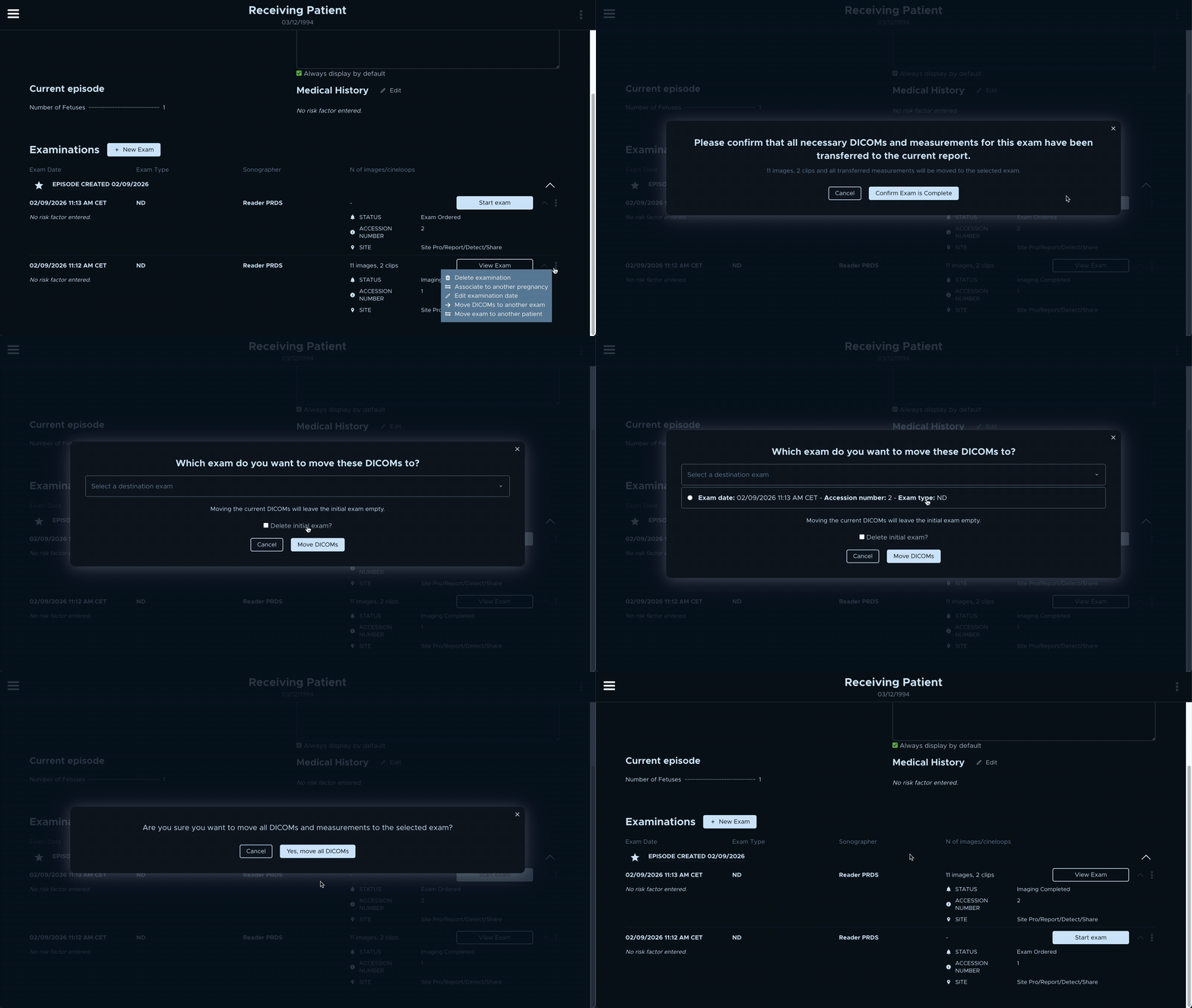
Please note some situations, such as multi-fetal exams, still need support from Sonio. For detailed instructions please review the following help documents:
-
How to Move Images (within the same patient record)
-
Note: To move images to a different patient, the entire exam needs to be moved to the intended patient and then images can be moved
-
Finalize Reports Faster from the PDF Preview
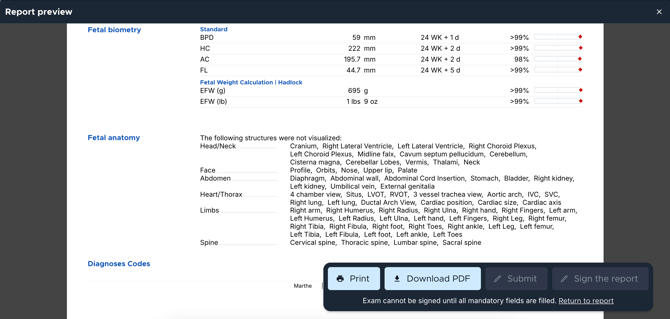
Previously, signing or submitting a report meant navigating back from the PDF preview to the report page. Now, you can Submit or Sign directly from the PDF preview — cutting out unnecessary steps so you can finalize reports faster. If mandatory fields are still missing, a short message will guide you back to complete them.
👀 Coming soon
Ready to level up? We’re building a new program designed to deliver personalized performance insights and expert contents straight to you. Join the waitlist now for exclusive early access and get updates before anyone else.
Also in This Release
- More automated calculations: Right and Left Ovary volume are now automatically calculated based on length, width and height measurements
- Multi-window fix: Opening an exam in a dual-screen setup now correctly loads images on one screen and the report on the other
- Dashboard stability: The dashboard no longer blinks when images are being received
- TeleMFM provider selection fix: You can now select the correct Reading provider when enabling TeleMFM
- Image attachment fix: Adding a new image to a report no longer replaces the default image — both now display correctly side by side
- Zero-value measurements: 0 is now recognized as a value in measurement fields, no longer blocking Submit or Sign functions
- Multi-fetal mandatory fields fix: Missing mandatory fields are now clearly highlighted in red for each fetus, making it easier to identify what needs to be completed before submitting or signing multifetal reports
- Improved Philips measurement mapping: Philips measurements (including MVP and fetal dopplers) are now extracted and mapped correctly
- Clips consistently associated: Changing the exam type no longer causes clips to lose their association
- Clearer uploaded and imported images: Images from NST, manual uploads, and 3D viewer imports are now higher quality, making patient information easier to read at a glance.