![Sonio-logo-samsung-1 1-1.png]](https://lp.sonio.ai/hs-fs/hubfs/Sonio-logo-samsung-1%201-1.png?height=40&name=Sonio-logo-samsung-1%201-1.png)

New report automations now live!
Sonio is always working on ways to make documentation easier with fewer clicks. So you will now find the following fields auto-populate when the proper annotations are detected on your ultrasound images:
- Fetal Sex (annotations include "male", "boy", "♂", "penis", "female", "girl", "♀", "labia", etc.)
- Cul-de-sac auto-populates with “free fluid visualized” on Pelvic exams (annotations include "Free Fluid", "CDS FF", “CDS fluid”, “CDS free fluid”, “Cul de sac fluid”, “Pouch of Douglas fluid”)
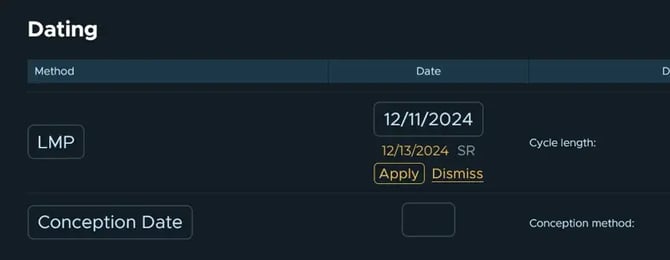
- LMP Dating will populate from the ultrasound machine, when available
- If an LMP value already exists from carry-forward or manual entry, users will be presented with both values to select from
Expanded capabilities with Patient MRN
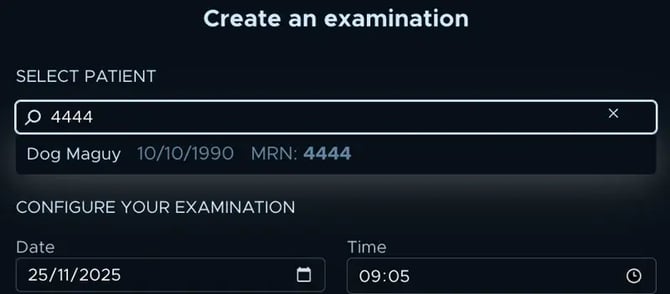
We heard your desire to be able to rely on Patient Medical Record Number (MRN) more throughout Sonio so we’ve added the following capabilities
- Ability to search for a patient on the dashboard using MRN

- Ability to add MRN to an existing patient, if it’s empty
- Note: Support request is still needed to change an existing Patient MRN
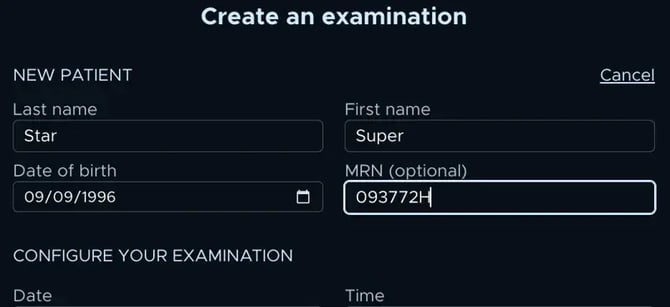
- Ability to add MRN for a new patient when creating an exam
More improvements
-
For multi-fetal exams, consistent mapping of biometry and growth curve measurements between the ultrasound machine and report based on DICOM Fetus ID